
Car Launcher
Apps LabDevAuto & Vehicles
4.3588.00 Reviews
- Version
- 5.7.0.21
- Installs
- 1.00M
- Age Rating
- Everyone
Screenshots
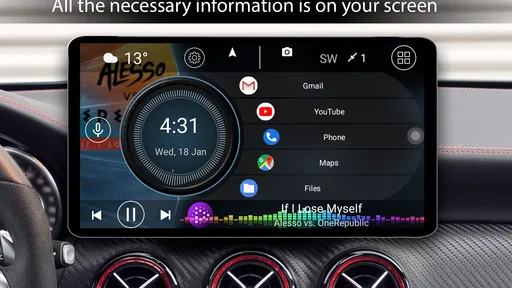
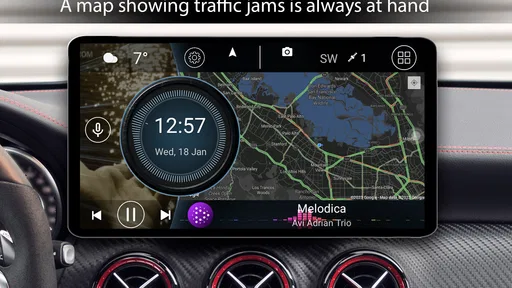
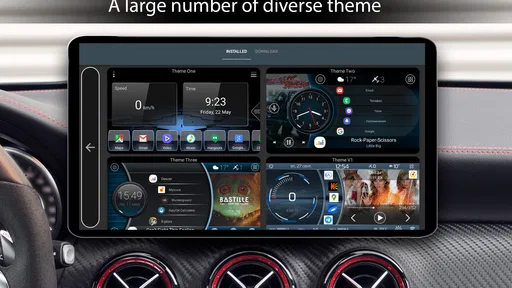
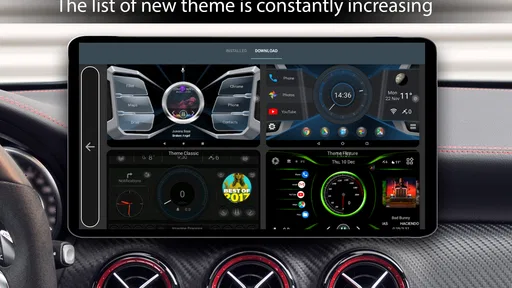
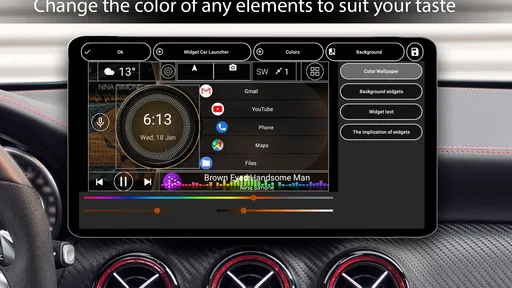
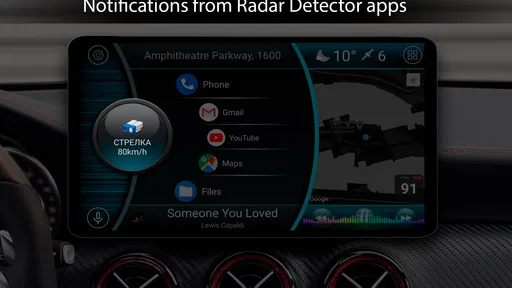
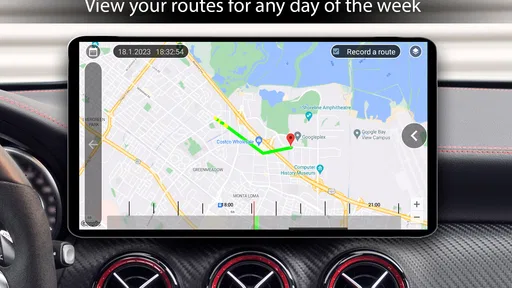
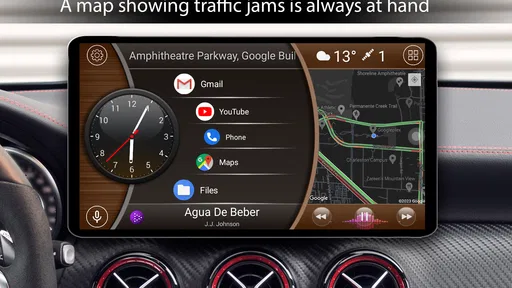
Our Review of Car Launcher
 Analysis by Appyee
Car Launcher is the kind of Android app that sounds simple until you try to make it behave exactly as you want inside a real car. I installed it with that practical question in mind: can it make driving-related controls easier to reach without turning the phone into another source of distraction? My answer is cautiously positive. It gives an Android phone a more car-oriented starting point, but the quality of the experience depends heavily on the phone, the mount, the screen, and the way the launcher is configured.
Developed by Apps LabDev, this free Auto & Vehicles app has grown into a widely used option, with over one million installs and a 4.3 average from around eighty-six thousand ratings. Those numbers suggest that the basic idea works for many people: replace a normal phone home screen with something that feels more suitable for the dashboard. The important distinction is that this is a launcher, not a complete replacement for every part of a vehicle’s infotainment system.
I would recommend it to someone who keeps an Android phone mounted in an older car, uses navigation and audio regularly, and wants larger, more direct access to the tools already on the phone. I would be more hesitant for anyone expecting a full Android Auto-style system, seamless car integration, or a completely hands-off driving experience. The app can organize the phone better, but it cannot turn every phone or vehicle into a modern built-in console.
Where the first problems usually appear
The first point of friction is often the word “launcher.” Some users expect a dashboard interface that automatically controls navigation, music, calls, vehicle data, and connectivity. In practice, a launcher mainly changes what appears when you return to the phone’s home screen. It can make the phone feel more appropriate for the car, but the apps it opens still depend on the apps installed on the device and on Android’s own behavior.
That distinction matters when deciding whether this is the right download. If your main complaint is that the standard Android home screen is awkward to use while the phone is mounted, Car Launcher addresses the problem directly. If your complaint is that the phone does not connect reliably to the car stereo, loses mobile data, or fails to show navigation on the vehicle display, changing the launcher may not solve the underlying issue.
Another common sticking point is the first setup. A car interface has to balance visibility with simplicity. You may want a large clock, quick access to navigation, and a familiar audio app, but every extra shortcut adds another decision to make while driving. I found that the best approach is to begin with only the actions I use on almost every trip. The launcher becomes more useful when it reduces choices rather than displaying every possible one.
There is also a human-factor issue that is easy to overlook. A larger button may be easier to tap, but it does not make tapping safe while moving. I treat the interface as something to prepare before leaving, not as permission to browse or adjust settings on the road. The app’s value is greatest when it shortens the preparation process and makes essential controls easier to find at a glance.
What to check before blaming the launcher
When an icon does not open, the first thing I check is whether the destination app works normally from the regular Android screen. If navigation, music, or another tool is disabled, outdated, signed out, or blocked by the phone, the launcher is only exposing a problem that already exists. Testing the same app outside Car Launcher is a quick way to separate an interface issue from an application issue.
I also check the phone’s default home-app setting. Android may ask which launcher should handle the Home button, and selecting the wrong option can make the experience seem inconsistent. Sometimes the custom dashboard appears after one action but the normal home screen returns after another. That is usually a system-selection problem rather than a failure of the dashboard itself.
Screen orientation is another practical detail. A phone mounted horizontally may show a layout that feels natural in the car, while a vertical mount can make the same arrangement less comfortable. Before adjusting anything, I decide how the phone will actually sit in the vehicle. Setting up the interface while holding the device in the opposite orientation can lead to poor placement and unnecessary reconfiguration later.
Brightness and lock behavior deserve attention too. A launcher can present a clearer dashboard, but the phone’s display settings still influence whether it is readable in sunlight or distracting at night. I prefer to configure brightness and screen timeout before a trip, then test the result while parked. If the display keeps going dark when I need directions, the cause may be Android’s screen settings, the navigation app, or the phone’s battery management rather than Car Launcher.
The current release is version 5.7.0.21, and it runs on Android 5.0 or later. That broad compatibility is useful for older spare phones, which are often the devices people dedicate to a car. At the same time, an older operating system can have different launcher rules, notification behavior, and battery controls. A phone meeting the minimum requirement may still need more careful testing than a recent handset.
A setup routine that avoids most confusion
My preferred setup starts with the phone outside the car. I install the launcher, open it on a stable Wi-Fi connection, and confirm that the normal functions of the phone still work. Then I place the device in its actual mount and check the viewing angle. This prevents me from trying to solve layout, connectivity, and mounting problems simultaneously in a parked car.
Next, I choose the small group of shortcuts I genuinely need. Navigation is usually first, followed by the audio app I already use. If I regularly make calls from the phone, I test that workflow separately instead of assuming a launcher change will alter the phone’s calling behavior. The useful question is not “Can I put everything on the screen?” but “Which actions should be reachable without searching?”
I also recommend taking a short stationary test drive only after the basics are ready. Sit in the driver’s position, check whether the important controls can be recognized without leaning forward, and make sure the mount does not block the road view. If the screen is too busy, remove items. A sparse dashboard is usually more practical than an impressive one.
People sometimes wonder whether they need a new phone for this kind of app. Not necessarily. A spare Android handset can work well if it has a reliable battery, a usable display, and access to the apps required for the trip. However, a dedicated phone introduces its own maintenance tasks: charging it, keeping navigation data or mobile access available, and updating the apps it depends on. Car Launcher can simplify the front screen, but it does not remove those responsibilities.
The app is free to download, with optional in-app purchases ranging from $2.59 to $14.99 per item. I see that as a reason to begin with the free experience and decide whether the interface genuinely improves your routine before paying for extras. The important test is not how many visual adjustments are available; it is whether the version you use makes the phone easier to operate while parked and easier to glance at when appropriate.
Recovering a workflow when something stops working
A realistic example is a morning commute after an Android update. You place the phone in the mount, open the dashboard, and tap navigation, but the expected screen does not appear. I would not immediately reinstall Car Launcher. First, I would open navigation from the normal app list, confirm that location is working, and check whether the phone has a data connection. If navigation fails there too, the launcher is not the main suspect.
If the destination app works normally but the dashboard shortcut does not, I would remove and recreate that shortcut, then restart the phone if needed. This is a safer recovery path than changing several settings at once because it identifies whether the problem is limited to one shortcut. After each change, I would test while parked so that the troubleshooting itself does not become a driving distraction.
Another useful recovery habit is to keep a simple fallback. I leave the regular Android app drawer available and remember where the navigation and audio apps are located. That does not defeat the purpose of a car launcher; it gives me a way to reach an essential app if the custom screen behaves unexpectedly. A dashboard should improve access, not make the phone unusable when one layer has a problem.
When the interface feels slow, I look at the phone as a whole. Too many background apps, low free storage, an aging battery, or aggressive power-saving settings can make any launcher feel unreliable. Closing unused apps and restarting the phone are ordinary maintenance steps, but they are often more useful than repeatedly changing the dashboard layout. I would also test the device without the car charger, because a poor charger or cable can create strange behavior that looks like a software fault.
Audio problems need a separate diagnosis. If the music app opens but sound does not come through the car speakers, the issue may be Bluetooth pairing, the selected audio source, the cable, or the vehicle stereo. The launcher’s job is to present the route to the audio app; it does not automatically repair the connection between the phone and the car. This is one of the most important boundaries to understand before installing it.
When the app is not the cause
Location failures are especially easy to misattribute. A dashboard can launch navigation, but it cannot create a GPS signal where the phone has poor reception or where Android has restricted location access. If the map position is wrong, I test the navigation app by itself, check the phone’s location setting, and wait until the device has a clear view of the sky. The launcher should only be judged after those basics work.
Likewise, a black screen or sudden return to the lock screen may come from the phone’s power settings, heat, a loose cable, or the mount pressing a side button. Cars expose phones to temperature changes and vibration that are uncommon at home. If the problem appears only after the phone has been charging in sunlight, I treat heat and power as stronger suspects than the launcher’s visual interface.
Notifications can also create confusion. A launcher may make the home screen look cleaner, but Android still controls which notifications appear and how they behave. If messages or calls are not shown as expected, I check the relevant Android notification settings and the individual app’s settings. I do not assume that a different home screen should override those controls.
This is where the app compares favorably with a normal home screen but less favorably with a purpose-built vehicle system. The standard Android screen is flexible and familiar, yet it often spreads useful car actions across small icons, widgets, and pages. Car Launcher gives the phone a more focused starting point. A built-in system or Android Auto-style solution, when supported by the vehicle and phone, generally offers deeper integration with the car’s controls and audio display. For someone who already has that reliable setup, this app may add little.
On the other hand, owners of older cars can benefit from the lower commitment. There is no need to replace the stereo simply to make a mounted phone easier to approach. The trade-off is that the phone remains a separate device. You still need a safe mount, a sensible charging arrangement, and a clear plan for audio and navigation. The app improves the interface layer; it does not provide the physical integration of a factory system.
Who will get the most from it
I think Car Launcher suits drivers who use a phone as a practical companion rather than as a complete infotainment replacement. It is particularly appealing for an older vehicle with no modern dashboard interface, a delivery or service routine where the same few apps are used repeatedly, or a spare phone that needs a simpler car-focused starting screen.
It can also help passengers who manage navigation or audio from a mounted device, provided the driver is not expected to interact with the screen while moving. The larger, more direct presentation feels more appropriate than a crowded personal home screen, especially when the phone is viewed from a fixed position.
I would skip it if you want a polished, zero-configuration experience. The app rewards a little setup and testing, and some users will find that effort unnecessary if their regular Android home screen already provides the shortcuts they need. I would also choose a different solution if your priority is steering-wheel control, vehicle data, or a seamless display on the car’s built-in screen. Those needs belong to a deeper integration layer than a launcher can provide.
The Everyone content rating makes it broadly suitable from an age-classification standpoint, but that should not be confused with suitability for unsupervised driving behavior. The responsible use case is simple: configure it before departure, use voice or physical controls where available, and avoid interacting with the display when traffic demands attention.
My practical verdict after using it
Car Launcher succeeds when the problem is an ordinary phone screen that feels poorly organized in a car. It gives an older Android device a more purposeful starting point and can make repeated routines less frustrating. I especially like the idea of using it on a dedicated spare phone, where the home screen can stay focused on navigation, audio, and the few tools needed on the road.
Its limitations are just as important. It does not automatically fix Bluetooth, GPS, charging, mobile data, notifications, or a vehicle’s lack of compatible infotainment hardware. Setup choices matter, and troubleshooting requires checking Android and the destination apps rather than blaming the launcher for every failure. That may sound obvious, but it is the difference between a useful dashboard and a frustrating one.
For a free app from Apps LabDev with a long presence on Android, a 4.3 average, and a large installed audience, I consider it worth trying if you want a cleaner mounted-phone experience. Start with the free version, keep the layout deliberately simple, test every important shortcut while parked, and retain a fallback route to the normal Android interface. The best result comes from treating it as a focused front door for your car apps, not as a replacement for the car itself.
Verdict
Strengths of Car Launcher
- Large, readable buttons make driving-focused controls easier to access.
- Supports customizable shortcuts for frequently used apps and functions.
- Displays useful vehicle information such as speed, GPS position, and trip data.
- Works with many Android head units and can replace a standard home screen.
- Offers multiple themes and layout options for a more personalized dashboard.
Limitations of Car Launcher
- Some advanced features may require a paid version or in-app purchase.
- Compatibility and performance can vary between phones and car stereos.
- The interface may feel dated compared with newer Android Auto designs.
- Background GPS use can increase battery consumption during longer journeys.
- Setup may take time if you want to customize every shortcut and display option.
Other Releases by Apps LabDev
View All
Car Launcher Pro
Auto & Vehicles4.4

CL Theme Flexure
Auto & Vehicles4.1
Similar Picks in This Category
View All
Android Auto
Google LLC4.1

maxim — order a taxi & food
PT. SITO4.7

Штрафы ГИБДД: проверка с фото
Pays LLC – Штрафы ГИБДД4.7

Номерограм – проверка авто
Авто Ассист4.8

Дром Авто
Дром4.9

Frequently Asked Questions
What is Car Launcher and what is it used for?
Car Launcher is an Android interface designed for use in vehicles, replacing or complementing the standard home screen with a larger, driving-friendly layout. It can provide quick access to navigation, music, phone functions, vehicle information, and other installed apps. Its main purpose is to make common controls easier to reach while driving, although users should always configure it before starting a journey and avoid interacting with the screen while the vehicle is moving.
Is Car Launcher compatible with every Android phone and car stereo?
Compatibility depends on the specific version of Android, the phone or tablet model, screen resolution, and the capabilities of the car stereo. Car Launcher generally works best on Android-based head units and devices with Google Play access, but some features may behave differently on older hardware or customized systems. Before downloading, check the app’s current requirements, supported Android version, and whether your vehicle display allows third-party launcher applications.
Does Car Launcher include navigation, music, and hands-free calling?
Car Launcher usually acts as a central dashboard rather than replacing every individual service. It can offer shortcuts or widgets for navigation apps, music players, phone tools, and other applications already installed on the device. The actual navigation maps, streaming catalog, voice controls, and call quality depend on those separate apps and your phone or head unit. Internet access may also be required for live traffic, online music, or connected services.
Can I customize the appearance and layout of Car Launcher?
One of Car Launcher’s main attractions is its customization. Depending on the edition and device, users may be able to change themes, backgrounds, widgets, clock styles, icons, shortcuts, and dashboard layouts. This allows the interface to match different vehicles and personal preferences. However, extensive customization can make the screen more distracting, so it is best to choose a simple layout with large controls and configure everything while parked.
Is Car Launcher free, and are there any limitations or privacy concerns?
Car Launcher may be available as a free download with optional premium features, although pricing and included tools can vary by version, region, and platform. Some advanced themes, widgets, or customization options may require an upgrade. Before installing, review the Google Play listing for current purchases, advertisements, and permissions. Also check what access the app requests, particularly location, phone, storage, or network permissions, and allow only what is necessary for the features you intend to use.
